
Work the email, not the tabs.
Goodman OS runs inside Outlook. Draft replies, read attachments, and check facts without leaving the message.
Draft where you read.
The panel sits next to the open message. It reads the thread and drafts your reply in place.
Replies that know the matter
You set the ask. It returns a first draft built from the message and its attachments. You edit before anything sends.
Long chain, short brief
Paste a messy thread and get what was agreed, what's open, and who owes what.
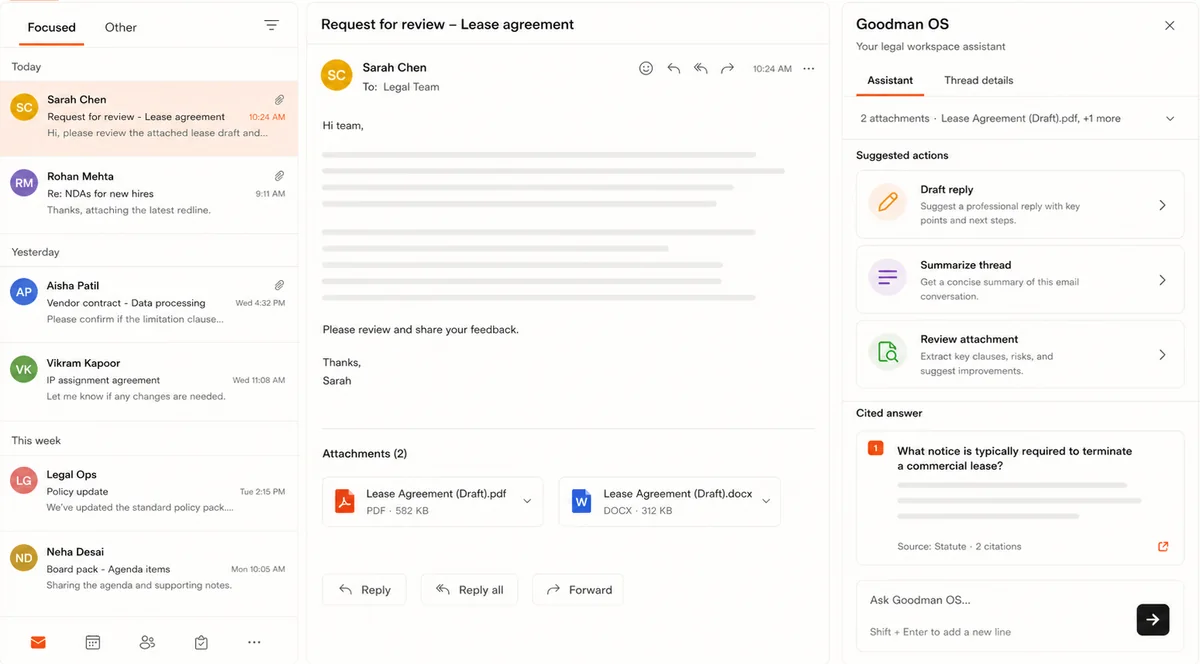
- Draft in place. Grounded in the open message and attachments.
- Summarize the chain. Twenty messages into a short brief.
- Set the tone. Formal to a counterparty, plain to a client.
- You send. Nothing leaves until you approve.
Open the attachment in place.
The add-in reads attachments as they land. No download, no upload, no separate tool.
Question the document
Ask what changed in the redline or where the indemnity sits. The answer points to the clause.
Catch it before you forward
Spot odd terms or missing provisions in an inbound draft. You decide what to escalate.
Your mail stays yours.
Privilege lives in email. The add-in handles it that way - nothing trains a shared model.
Private by default
Messages and attachments serve your prompt and nothing else. Never used to train models outside your firm.
Fits your IT
Runs through your Microsoft 365 admin controls and honors the permissions you already set.
- Cited to source. Claims trace to the message or clause.
- Permission-aware. Sees only what the user already can.
- Standards in progress. SOC 2 and ISO 27001 underway.
- Lawyer-driven. It proposes; you decide and send.
The inbox is one part.
Same Goodman OS your team uses everywhere else. See the rest.
The AI workspace your lawyers drive. Review, draft, research - all cited.
Explore Goodman OS ->Ask legal questions. Get answers backed by authority, sources in view.
See Legal Research in Goodman OS ->Try it on a live thread.
Watch it draft, summarize, and read attachments - with your lawyers in control.
Built for lawyers / Private by default / Cited to source